When we get some time we will definitely document our approach. Here is a short summary.
We are supporting classes using either RStudio or Jupyter. So we provide class.osc.edu with a dashboard that looks like:
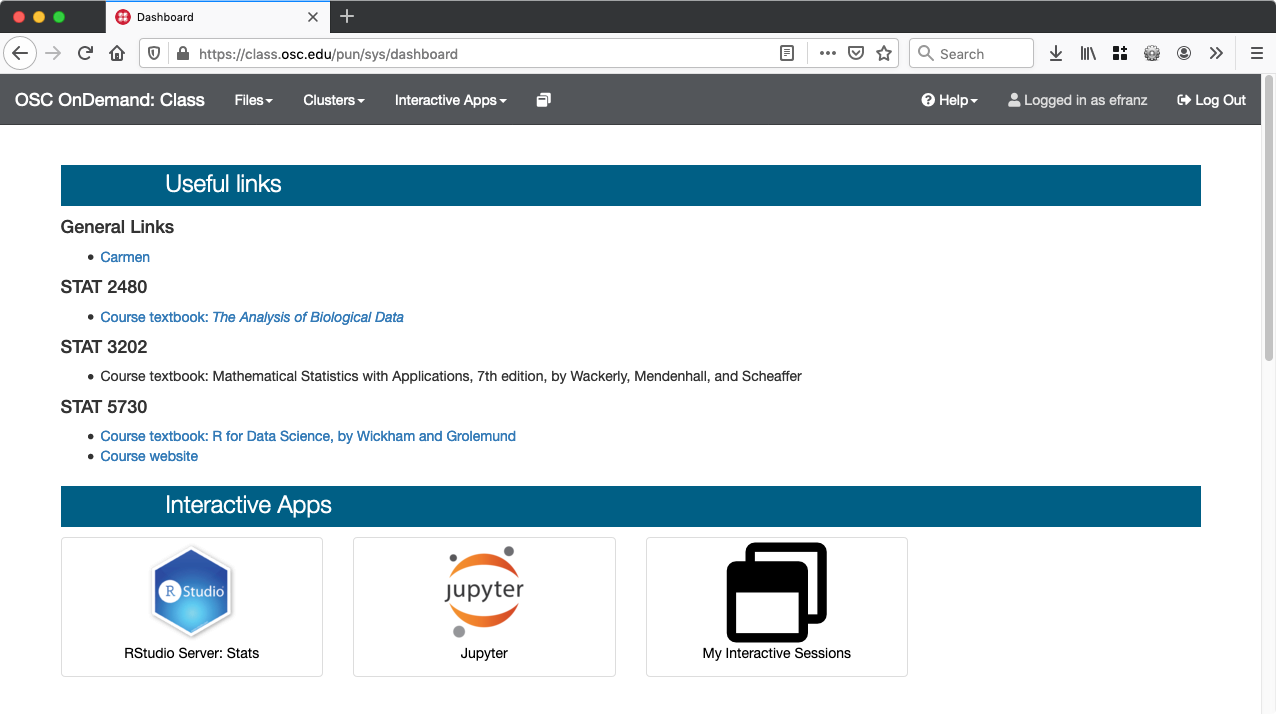
Most of the /etc/ood/config files are in osc-ood-config/class.osc.edu at master · OSC/osc-ood-config · GitHub. We customize the dashboard using the locales file by providing an override for the welcome_html key osc-ood-config/en.yml at 13b89d6c877130b8d18febd813f8829f5189aabe · OSC/osc-ood-config · GitHub and use the <h2 class="apps-section-header-blue"> - those headers are the same styling that the OnDemand dashboard in app sharing mode uses. We add large icons for Jupyter and RStudio and hardcode the links to the corresponding web forms for each app. This is a kinda hack-solution but it gets around not having a nicer iconified dashboard (something we will work on in OnDemand 2.0). We also add helpful links for each class and a link to Canvas at the top (OSU’s Carmen).
We are reusing the juptyer and rstudio apps we deploy in ondemand.osc.edu so our overrides/customizations to the web forms are done via the /etc/ood/config as well (see https://github.com/OSC/osc-ood-config/tree/master/class.osc.edu/apps/bc_osc_rstudio_server for an example).
Our RStudio and Jupyter apps provide dropdown to select the class you are in so that, for example, Jupyter notebooks the professor adds to project space are copied to the student’s home directory during launch, so they can have a copy of the notebook to work with.
Each class has its own project/group so that we can assign a reservation of node(s) to that class to ensure there are no queue times and student’s RStudio/Jupyter sessions start immediately.
The configuration for the RStudio and Jupyter apps are split between
- GitHub - OSC/bc_osc_rstudio_server: Batch Connect - OSC RStudio Server
- GitHub - OSC/bc_osc_jupyter: Batch Connect - OSC Jupyter Notebook Server
- osc-ood-config/class.osc.edu/apps/bc_osc_jupyter at 13b89d6c877130b8d18febd813f8829f5189aabe · OSC/osc-ood-config · GitHub
- osc-ood-config/class.osc.edu/apps/bc_osc_rstudio_server at 13b89d6c877130b8d18febd813f8829f5189aabe · OSC/osc-ood-config · GitHub