Watching a category or tag is a way of getting notifications whenever a new topic is created in the categories or tags you want to follow.
If you’re on a category or topic you are interested in, click on the “bell” to choose how you’d like to get notified.
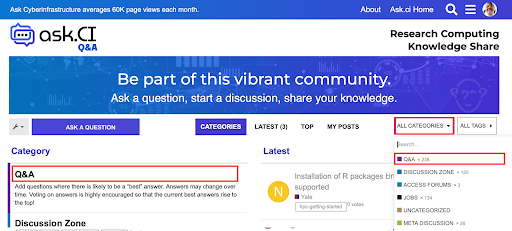
As an example, we’ll subscribe to the Q&A category.
First, go to the Q&A category. You can get there with the Categories button on the homepage or the site’s menu:
Then click on the bell Icon button (1) and select a notification setting (2):
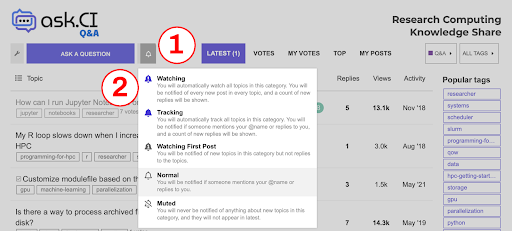
Here’s what each setting does:
- Watching. Get notifications for all new topics and replies in this category.
- Tracking. Get notifications of new topics, or when you’re mentioned.
- Watching First Post. Get notifications of new topics, but not when you’re mentioned.
- Normal. Only get notifications when you’re mentioned.
- Muted. You won’t get any notifications from this category. This is useful for Categories that you know you won’t be interested in.
If you have Ask.CI open in your browser, you’ll see a notification appear in real time on the site. If you’re not logged into the site, an email will be sent to you.
You can unsubscribe from these notifications at any time by changing your settings back to Regular.
You can see a list of all the tags here and and all the categories here .