I am attempting to install packages into my R environment using RStudio in Open OnDemand on Cheaha. When I do, I receive errors about failed compilation and the package is not installed. Why is this happening and what can be done about it?
When using the RStudio Server app (the non-deprecated version) on Open OnDemand, some packages that need C++ compilation will not install correctly when run directly from either the RStudio console or the Install Packages button. As a temporary workaround, you can install the packages from the terminal inside RStudio.
-
Select the Terminal tab next to the Console tab.
-
Load the same R module you loaded when requesting the session using the
module load R/<insert version>command. -
Load any other modules necessary for installing the R packages you need. Examples include modules such as
harfbuzzorfribidi.- If a dependency you need is not installed as a module, and can’t be added using R, please email support so we can work together to resolve the issue.
-
Start R using the
Rcommand. -
Install the packages you need using R’s
install.packagescommand (or whichever other package installer you need, such asBiocManager::install).- For some people, the
utilspackage may not be loaded initially causing R to not be able to find theinstall.packagescommand. Uselibrary(utils)first, then useinstall.packages.
- For some people, the
-
Once your packages are installed, close the terminal by clicking the dropdown and selecting
Close Terminal. This will free the resources the terminal R session was using for RStudio to be able to use again.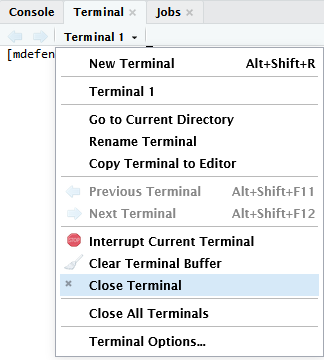

Your R packages should now be available for use.